
dvui
DVUI is a general purpose Zig GUI toolkit.
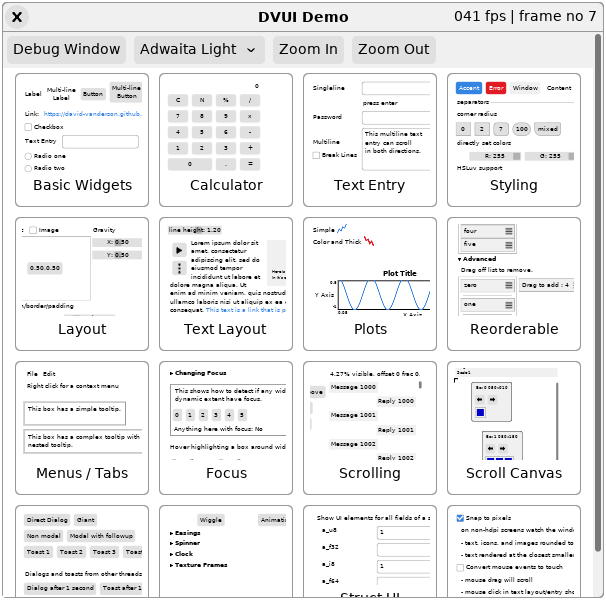
dvui module has everything required by client code. const dvui = @import("dvui"); is the only required import.
Most UI widgets can be created via high level functions like dvui.button, which create the underlying dvui.ButtonWidget for you, process events, and draw the widget.
For more control over a widget's lifetime, event processing, or drawing, start by copying the body of the high level function. More informations is available in the project's readme.
A complete list of available widgets can be found under dvui.widgets. The demo includes examples of all widgets.
Backends
Types
- Id
A generic id created by hashing
std.builting.SourceLocation's (from@src())- CaptureMouse
Used to track which widget holds mouse capture.
- hashSrc
DEPRECATED: See
dvui.Id.extendId- hashIdKey
DEPRECATED: See
dvui.Id.update- EventMatchOptions
Data for matching events to widgets. See
eventMatch.- Animation
Animation state - see
animationandanimationGet.- TabIndexGroup
Creates a nested group for Options.tab_index values. tab_index controls
- Picture
Captures dvui drawing to part of the screen in a
Texture.- RenderFrontToBack
Reverse the normal back-to-front rendering order. Rendering inside is
- SyntaxHighlight
Used with TreeSitter
Namespaces
Type Functions
Functions
- textureGetCached
Gets a texture from the internal texture cache. If a texture
- textureAddToCache
See
Texture.Cache.add- textureInvalidateCache
See
Texture.Cache.invalidate- textureRetain
Retain this texture key.
- textureRelease
Release this texture key. dvui will free its texture normally.
- textureRetainToken
Set retain token for this texture key. null means remove retain token.
- releaseAllToken
Clear retain for all textures and values with this retain token.
- dragPreStart
See
Dragging.preStart- dragStart
See
Dragging.start- dragOffset
Get offset previously given to
dragPreStartordragStart.- dragRect
Get rect from mouse position using offset and size previously given to
- dragging
See
Dragging.get- dragName
True if
dragginganddragStart(ordragPreStart) was the given name.- dragEnd
Stop any mouse drag.
- currentWindow
Get the current
dvui.Windowwhich corresponds to the OS window we are- mouseType
Guess which type of pointing device is being used (touchpad vs. mouse).
- widgetAlloc
Allocates space for a widget to the alloc stack, or the arena
- widgetFree
Pops a widget off the alloc stack, if it was allocated there.
- widgetIsAllocated
Returns whether the widget was created with widgetAlloc.
- themeGet
Get the active theme.
- themeSet
Set the active theme.
- toggleDebugWindow
Toggle showing the debug window (run during
Window.end).- frameTimeNS
Nanosecond timestamp for this frame.
- addFont
Add font to be referenced later by name.
- svgToTvg
Takes in svg bytes and returns a tvg bytes that can be used
- iconWidth
Get the width of an icon at a specified height.
- focusedSubwindowId
Id of the currently focused subwindow. Used by
FloatingMenuWidgetto- focusSubwindow
Focus a subwindow.
- raiseSubwindow
Raise a subwindow to the top of the stack.
- focusWidget
Focus a widget in the given subwindow (if null, the current subwindow).
- focusedWidgetId
Id of the focused widget (if any) in the focused subwindow.
- focusedWidgetIdInCurrentSubwindow
Id of the focused widget (if any) in the current subwindow.
- lastFocusedIdInFrame
Last widget id we saw this frame that was the focused widget.
- lastFocusedIdInFrameSince
Pass result from
lastFocusedIdInFrame. Returns the id of a widget that- lastFocusedIdInSubwindow
Last widget id we saw in the current subwindow that was focused.
- cursorSet
Set cursor the app should use if not already set this frame.
- subwindowAdd
Called by floating widgets to participate in subwindow stacking - the order
- subwindowCurrentSet
Used by floating windows (subwindows) to install themselves as the current
- subwindowCurrentId
Id of current subwindow (the one widgets run now will be in).
- mouseTotalMotion
The difference between the final mouse position this frame and last frame.
- captureMouse
Capture the mouse for this widget's data.
- captureMouseCustom
In most cases, use
captureMousebut if you want to customize the- captureMouseMaintain
If the widget ID passed has mouse capture, this maintains that capture for
- captured
Test if the passed widget ID currently has mouse capture.
- captureMouseGet
Get the widget ID that currently has mouse capture or null if none.
- clipGet
Get current screen rectangle in pixels that drawing is being clipped to.
- clip
Intersect the given physical rect with the current clipping rect and set
- clipSet
Set the current clipping rect to the given physical rect.
- alpha
Multiplies the current alpha value with the passed in multiplier.
- alphaSet
Set the current alpha value [0-1] where 1 is fully opaque.
- snapToPixelsSet
Set snap_to_pixels setting. If true:
- snapToPixels
Get current snap_to_pixels setting. See
snapToPixelsSet.- kerningSet
Set kerning setting. If true:
- refresh
Requests another frame to be shown.
- clipboardText
Get the textual content of the system clipboard. Caller must copy.
- clipboardTextSet
Set the textual content of the system clipboard.
- openURL
Ask the system to open the given url.
- secondsSinceLastFrame
Seconds elapsed between last frame and current. This value can be quite
- FPS
Average frames per second over the past 30 frames.
- parentGet
Get the Widget that would be the parent of a new widget.
- parentSet
Make w the new parent widget. See
parentGet.- parentReset
Make a previous parent widget the current parent.
- renderingSet
Set if dvui should immediately render, and return the previous setting.
- windowRect
Get the OS window size in natural pixels. Physical pixels might be more on
- windowRectPixels
Get the OS window size in pixels. See
windowRect.- windowRectScale
Get the Rect and scale factor for the OS window. The Rect is in pixels,
- windowNaturalScale
The natural scale is how many pixels per natural pixel. Useful for
- firstFrame
True if this is the first frame we've seen this widget id, meaning we don't
- minSizeGet
Get the min size recorded for id from last frame or null if id was not seen
- minSize
Return the maximum of min_size and the min size for id from last frame.
- dataSet
Store value under key (id+name).
- dataSetDeinitFunction
Set a deinit function for value stored under key (id+name).
- dataRetain
Set retain token for this key (id+name). null means remove retain token.
- dataSetSlice
Set value for key (id+name), copying the slice contents. Can be passed a
- dataSetSliceCopies
Same as
dataSetSlice, but will copy valuenum_copiestimes all concatenated- dataGet
Retrieve the value for key (id+name).
- dataGetDefault
Retrieve the value for key (id+name). If no value was stored, store default and then return it.
- dataGetPtrDefault
Retrieve a pointer to the value for key (id+name). If no value was
- dataGetPtr
Retrieve a pointer to the value for key (id+name).
- dataGetSlice
Retrieve slice contents for key (id+name).
- dataGetSliceDefault
Retrieve slice contents for key (id+name).
- dataRemove
Remove key (id+name) and associated value (if any). The value will be freed at next
- placeIn
Return a rect that fits inside avail given the options. avail wins over
- events
Get the slice of
Events for this frame.- eventMatchSimple
Wrapper around
eventMatchfor normal usage.- eventMatch
Should e be processed by a widget with the given id and screen rect?
- clicked
Handles all events needed for clicking behaviour, used by
ButtonWidget.- animation
Add animation a to key associated with id. See
Animation.- animationGet
Retrieve an animation previously added with
animation. SeeAnimation.- timer
Add a timer for id that will be
timerDoneon the first frame after micros- timerGet
Return the number of micros left on the timer for id if there is one. If
- timerDone
Return true on the first frame after a timer has expired.
- timerDoneOrNone
Return true if
timerDoneor if there is no timer. Useful for periodic- scrollTo
Scroll the current containing scroll area to show the passed in screen rect
- scrollDrag
Bubbled from inside a scrollarea to ensure scrolling while dragging
- tabIndexSet
Set the tab order for this widget.
tab_indexvalues are visited starting- tabIndexNext
Move focus to the next widget in tab index order. Uses the tab index values from last frame.
- tabIndexPrev
Move focus to the previous widget in tab index order. Uses the tab index values from last frame.
- wantTextInput
Widgets that accept text input should call this on frames they have focus.
- floatingMenu
Temporary menu that floats above current layer. Usually contains multiple
- floatingWindow
Subwindow that the user can generally resize and move around. Options.rect
- osWindow
Spawn a new OS Window and subsequent widgets will be drawn on it.
- windowHeader
Normal widgets seen at the top of
floatingWindow. Includes a close- dialogAdd
Add a dialog to be displayed on the GUI thread during
Window.end.- dialogRemove
Only called from gui thread.
- dialog
Add a dialog to be displayed on the GUI thread during
Window.end.- toastAdd
Add a toast. Use
toastfor a simple message.- toastRemove
Remove a previously added toast.
- toastsFor
Returns toasts that were previously added with non-null subwindow_id.
- toast
Add a simple toast. Use
toastAddfor more complex toasts.- toastsShow
Standard way of showing toasts. For the main window, this is called with
- animate
Wrapper widget that takes a single child and animates it.
- dropdown
Show chosen entry, and click to display all entries in a floating menu.
- dropdownEnum
Show @tagName of choice, and click to display all tags in that enum in a floating menu.
- suggestion
Wraps a textEntry to provide an attached menu (dropdown) of choices.
- comboBox
Text entry widget with dropdown choices.
- expander
Arrow icon and label that remembers if it has been clicked (expanded).
- groupBox
A bordered box with a heading, used to group related widgets,
- paned
Splits area in two with a user-moveable sash between.
- textLayout
Show text with wrapping (optional). Supports mouse and touch selection.
- context
Context menu activated by mouse right click and touch "long press" (0.5s).
- tooltip
Show a floating text tooltip as long as the mouse is inside init_opts.active_rect.
- focusGroup
Turns off normal tab navigation. Use for things where tab should go to the
- radioGroup
focusGroupwhere the default role is "radio_group".- virtualParent
Shim to make widget ids unique.
- overlay
Lays out children according to gravity anywhere inside. Useful to overlap
- box
Box that packs children with gravity 0 or 1, or anywhere with gravity
- flexbox
Box laying out children horizontally, making new rows as needed.
- gridHeadingSeparator
Create either a draggable separator (resize_options != null)
- gridHeading
Create a heading with a static label
- gridHeadingSortable
Create a heading and allow the column to be sorted.
- gridHeadingCheckbox
A grid heading with a checkbox for select-all and select-none
- columnLayoutProportional
Size columns widths using ratios.
- separator
Widget for making thin lines to visually separate other widgets. Use
- spacer
Empty widget used to take up space with .min_size_content.
- link
A label that calls
openURLwhen clicked.- labelClick
A clickable label. See
link.- label
Format and display a label.
- labelEx
Format and display a label with extra label options.
- labelNoFmt
Display a label (no formatting) with extra label options.
- icon
Display an icon rasterized lazily from tvg_bytes.
- image
Show raster image. dvui will handle texture creation/destruction for you,
- slider
returns true if fraction (0-1) was changed
- sliderEntry
Combines a slider and a text entry box on key press. Displays value on top of slider.
- toUtf8
The returned slice is guaranteed to be valid utf8. If the passed in slice
- textEntryColor
A text entry for hex color codes. Supports the same formats as
Color.fromHex- colorPicker
A photoshop style color picker
- structUI
Display a struct and allow the user to edit values
Constants
- backend
Using this in application code will hinder ZLS from referencing the correct backend.
- accesskit_enabled
Accessibility
- max_float_safe
Used as a default maximum in various places:
Variables
- scroll_speed
The amount of logical pixels to scroll per "tick" of the scroll wheel.
- reduce_motion
When this is true,
animationoverwrites end_time so animations expire next frame.- current_window
Current
Window(i.e. the one that widgets will be added to).- io
Global Io used by dvui functions, set by the backend when it is initialized.
- debug
Global debug struct.
Error Sets
Aliases
- App
For apps that want dvui to provide the mainloop which runs these callbacks.
- Backend
Provides a consistent API for interacting with the backend
- Window
Maps to an OS window, and save all the state needed between frames.
- Path
A collection of points that make up a shape that can later be rendered to the screen.
- Profiler
A browser-DevTools-style profiler for a dvui GUI: a perf chart, a navigable
- widgets
You can find below a list of available widgets.
- OsWindowWidget
Spawn a new OS Window
- TabsWidget
Note on ARIA Roles
- GridWidget
A scrollable grid widget for displaying tabular data. Also known as a
- struct_ui
A group of functions for displaying and editing values in structs
- easing
Easing functions mainly used for animations. Controls the rate of change of a value,
- selection
Helpers for Multi and Single selection
- TrackingAutoHashMap
A wrapper around
std.HashMapUnmanagedthat stores ausedflag next- PNGEncoder
Physical size of image, pixels per meter added to png pHYs chunk.
- Toast
Toasts are just specialized dialogs
- AccessKit
Adds accessibility support to widgets via the AccessKit library
- Texture
A texture held by the backend. Can be drawn with
dvui.renderTexture.- TextureTarget
A texture held by the backend that can be drawn onto. See
dvui.Picture.- ImageSource
Source data for
image()andimageSize().- imageSize
Get the size of a raster image. If source is .imageFile, this only decodes
- textureCreate
Create a texture that can be rendered with
renderTexture.- textureUpdate
Update a texture that was created with
textureCreate.- textureUpdateSubRect
Update a sub-rectangle of a texture from raw PMA pixel data.
- textureCreateTarget
Create a texture that can be rendered with
renderTextureand drawn to- textureReadTarget
Read pixels from texture created with
textureCreateTarget.- textureFromTarget
Convert a target texture to a normal texture. target is destroyed. See
- textureDestroyLater
Destroy a texture created with
textureCreateat the end of the frame.- RenderCommand
Represents a deferred call to one of the render functions. This is how
- renderTarget
Change where dvui renders. Can pass output from
dvui.textureCreateTargetor- renderTriangles
Rendered
Trianglestaking in to account the current clip rect- renderText
Only renders a single line of text. Newlines are rendered as spaces.
- renderTexture
Only valid between
Window.beginandWindow.end.- renderIcon
Calls
renderTexturewith the texture created fromtvg_bytes- renderImage
Calls
renderTexturewith the texture created fromsource- renderNinepatch
Renders a ninepatch with the given parameters.
- layout
A collection of layout helper functions for placing widgets
- BasicLayout
Helper to layout widgets stacked vertically or horizontally.
- Alignment
Help left-align widgets by adding horizontal spacers.
- PlaceOnScreenAvoid
Controls how
placeOnScreenwill move start to avoid spawner.- placeOnScreen
Adjust start rect based on screen and spawner (like a context menu).
- dialogWasmFileOpen
Opens a file picker WITHOUT blocking. The file can be accessed by calling
wasmFileUploadedwith the same id- wasmFileUploaded
Will only return a non-null value for a single frame
- dialogWasmFileOpenMultiple
Opens a file picker WITHOUT blocking. The files can be accessed by calling
wasmFileUploadedMultiplewith the same id- wasmFileUploadedMultiple
Will only return a non-null value for a single frame
- dialogNativeFileOpen
Block while showing a native file open dialog. Return the selected file
- dialogNativeFileOpenMultiple
Block while showing a native file open dialog with multiple selection.
- dialogNativeFileSave
Block while showing a native file save dialog. Return the selected file
- dialogNativeFolderSelect
Block while showing a native folder select dialog. Return the selected
